MCP Server Overhead Benchmark: How Many Tokens Do Your Tools Really Cost?
TokenCheat Team
5/3/2026
Every MCP tool you register is injected into the system context as a JSON Schema definition. The model reads that schema on every single turn of the conversation. Most teams never measure this overhead. Here is how.
The hidden math
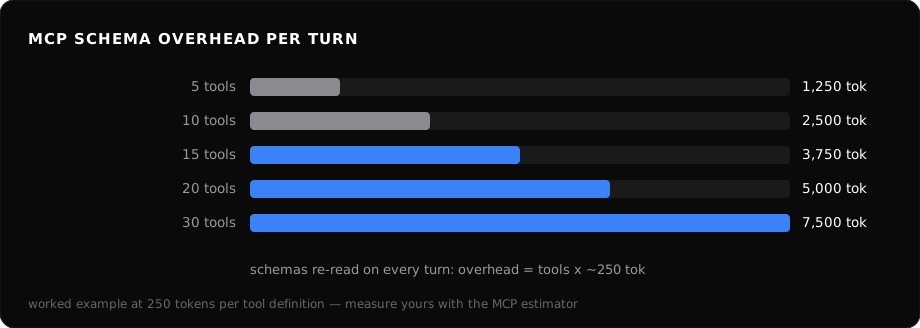
A typical MCP tool definition includes a name, description, and parameter schema with types, descriptions, and constraints. For common MCP servers (filesystem, GitHub, database, Slack, Notion, etc.), a typical tool definition runs 200-300 tokens; complex tools with nested object parameters can hit 400+. Don't take our word for it — paste your own .mcp.json into the free MCP estimator and measure yours.
The formula is straightforward:
Daily overhead = tools × avg_tokens_per_tool × turns_per_session × sessions_per_day
Benchmark results
| Tools registered | Avg tokens/tool | Turns/session | Sessions/day | Daily wasted tokens |
|---|---|---|---|---|
| 5 | 250 | 50 | 1 | 62,500 |
| 10 | 250 | 50 | 1 | 125,000 |
| 15 | 250 | 50 | 1 | 187,500 |
| 20 | 250 | 50 | 1 | 250,000 |
| 30 | 250 | 50 | 1 | 375,000 |
At Claude Opus 4.8 pricing ($5/M input), 30 tools cost you 375,000 × $5/M ≈ $1.88/day per developer in schema overhead alone. For a team of eight, that is $1.88 × 8 × 22 workdays ≈ $330/month before anyone calls a single tool — and double that on a frontier tier like Claude Fable 5 ($10/M).
How to measure it yourself
- Export a session transcript (Claude Code writes JSONL logs, or use TokenCheat's session exporter).
- Count the tool definitions in the system message. Each
toolblock is a discrete schema. - Tokenize each schema with
tiktokenor Anthropic's token counter. Sum them. - Multiply by turns in a typical session. That is your per-session overhead.
If you want a shortcut, TokenCheat's MCP estimator does this automatically — point it at your MCP config and it reports per-tool and aggregate overhead with cost projections.
How to reduce it
Prune unused tools. It is common to have 20+ tools registered while regularly calling only a handful. Audit your last 50 sessions. If a tool was never called, remove it.
Use disabled_tools config. Claude Code supports disabling specific tools without removing the server entirely. Disable tools you only need occasionally and re-enable them on demand.
Split servers by workflow. Instead of one monolithic MCP server with 30 tools, run task-specific servers. A code-review session does not need your deployment tools.
Shorten descriptions. Many tool descriptions contain paragraphs of explanation the model does not need. Trim them to one sentence. A 60-word description can often become 15 words without losing function.
The compounding problem
Schema overhead compounds with conversation length. A 100-turn debugging session with 20 tools reads the full tool surface 100 times. That is 500,000 tokens of repeated schema that never changes but always bills.
Prompt caching helps — Anthropic's cache can absorb stable tool definitions at 90% discount — but only if your system prompt is stable enough to hit cache. If you are busting cache on other parts of the prompt, the tool schemas pay full price every turn.
Bottom line
Measure your MCP tool surface the same way you measure API latency: regularly, with alerts when it drifts. TokenCheat's overhead benchmarks make this a five-minute check, not a research project.